Claude Desktop explained: the three modes most users don't know
Claude Desktop is more than a chatbox. Discover the three modes Chat, Cowork and Code, and what they can mean for your productivity and business.

Summary
- Claude Desktop offers three fundamentally different modes, but most users only know one
- Chat: conversational, available free and on paid plans, also via browser and mobile
- Claude Cowork: autonomous agent that processes local files, executes multi-step tasks and schedules recurring tasks automatically. Available on paid plans via the desktop app, and since July 2026 also in beta on web, iOS and Android
- Claude Code: agentic coding system at project level via terminal, VS Code or JetBrains. Works across multiple files simultaneously, not at line level like Copilot
- For whom: Cowork for knowledge workers without a technical background, Claude Code for builders and entrepreneurs who want to develop software
- ClickForest built three custom projects with Claude Code, including clickforest.com itself and a custom CRM system
Most people use Claude as a chatbox in the browser. They ask a question, get an answer, and close the tab. That is one of the three ways to use Claude, and far from the most powerful.
Claude Desktop is the downloadable app for macOS and Windows that gives access to three fundamentally different modes: regular chat, Claude Cowork and Claude Code. The last two are unknown territory for most professionals. This article explains what each of the three does, who it is intended for, and which paid subscription you need to access them.
In short: Claude Desktop is Anthropic’s downloadable app for macOS and Windows with three modes: Chat (a normal conversation), Cowork (an autonomous agent that works independently in your files) and Code (agentic programming). Chat works on any plan, Cowork and Code require a paid subscription. Below you will read what each mode does and who it is for.
What is Claude Desktop and what can you do with it?
Claude Desktop is the Anthropic desktop application for macOS and Windows, downloadable via claude.ai/download. Within the app you switch between three modes: Chat (conversational, like the browser version), Cowork (autonomous agent for knowledge work) and Code (agentic coding at project level). Each mode has a fundamentally different approach and a different target audience.
The chat mode: the entry point
The chat mode in Claude Desktop works almost identically to claude.ai in the browser. You ask a question, Claude answers. Available on all plans, including the free plan. Also accessible via browser and mobile.
It is the entry point everyone knows. But if you only use Claude this way, you miss the two modes that really matter for professionals and entrepreneurs. Both require a paid subscription and are at their fullest in the desktop app; Cowork has also been rolling out in beta to web and mobile since July 2026, and Claude Code also works via the terminal, VS Code and the browser.
What is the Cowork mode in short?
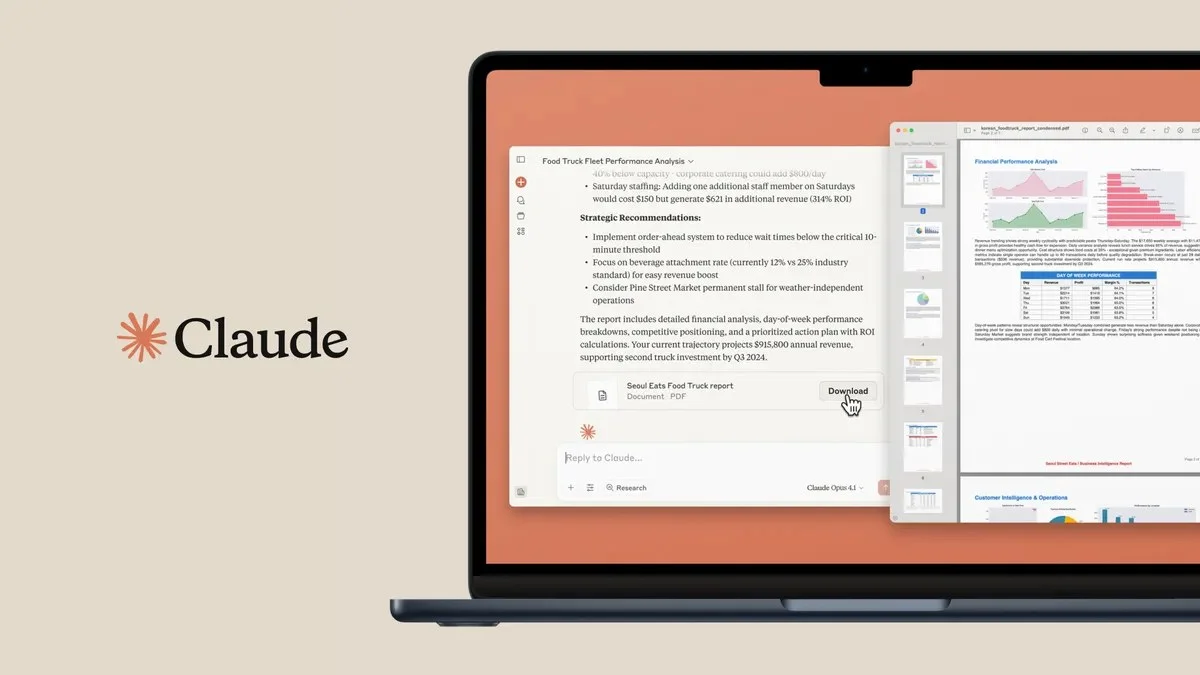
Claude Cowork is Claude’s agent mode: you state an end goal instead of a question, and Claude reads and writes local files, executes multi-step tasks and runs recurring assignments on a schedule. Think of a folder with 40 quotes as PDFs turning into an Excel analysis with working formulas, or a daily mail summary as a document on your desktop. Since 7 July 2026 Cowork has also been rolling out in beta to web and mobile; the desktop app remains the fullest experience with direct access to your local files.
“Cowork makes it possible for Claude to deliver finished, near-final work.”
— Scott White, Head of Product for Claude at Anthropic
Everything about Cowork, from pricing and availability to safety and limitations, is now covered in our separate guide Claude Cowork explained. Want to know how marketing automation fits into your marketing processes? That is exactly the kind of question an introductory call with ClickForest answers.
What is Claude Code and what do you use it for?
Claude Code is an agentic coding system that reads your entire codebase, makes changes across multiple files, runs tests and delivers committed code. It works at project level, not line level. Accessible via the terminal (CLI), the VS Code extension, JetBrains IDEs, the desktop app and the browser via claude.ai/code.
The crucial difference from tools like GitHub Copilot or ChatGPT for code: those suggest. Claude Code executes. Copilot works at line level and waits for your next keystroke. Claude Code understands the full structure of a project, plans an approach across multiple files, executes it, runs tests and fixes errors, without you approving every step.
Anthropic describes it on the product page: “For builders without a technical background it is a gateway to software development that did not exist until recently.”
Two entry points: terminal and VS Code
Via the terminal (CLI). You install Claude Code via a one-time command and then launch it from any project folder. Claude reads the entire codebase, modifies files, runs tests, makes commits and resolves issues across multiple files simultaneously. This is the most powerful and complete form, but requires basic comfort with the command line.
Via the VS Code extension. The same capabilities, but directly in your code editor. You open Claude Code as a panel next to your code, give an instruction in plain language, the extension modifies files, explains what it does and shows the changes for approval. The extension is also available for Cursor and JetBrains IDEs and now has well over two million installations. The VS Code extension is the entry point for those not used to the command line.
The distinction is practical: the terminal gives more control and more automation at scale, the VS Code extension is the lowest barrier for entrepreneurs who want to learn to build.
ClickForest guides Flemish SMEs in building with AI: from first idea to working custom tool, without needing a full development team.
What has ClickForest built with Claude Code?
ClickForest has used Claude Code as the primary build partner for three concrete projects, demonstrating that custom software is no longer reserved for large budgets.
ClickForest built a complete Astro website (clickforest.com itself) with Claude Code: multilingual in NL, FR and EN, built on Cloudflare Workers, including contact form, AI chatbot and an admin panel. ClickForest then built a custom CRM system (crm.clickforest.com), without external licences, precisely aligned with internal workflows. A third project was delivered for a client, with Claude Code as the central build environment.
ClickForest guides Flemish SMEs and scale-ups in Mechelen and the surrounding area in deploying AI for growth: from content production and AI chatbots for customer service to building custom software with AI. See what ClickForest built via the projects page.
Which subscription do you need for Claude Desktop?
| Mode | Available via | Subscription |
|---|---|---|
| Chat | Browser, app, mobile | Free or paid |
| Claude Cowork | Claude Desktop (macOS, Windows); beta on web and mobile | Pro, Max, Team or Enterprise |
| Claude Code | Terminal, VS Code, JetBrains, app, browser | Paid subscription or API billing |
Claude Cowork is included in all paid plans. Claude Code works on the same plans, but also via API billing for developers working directly with the Anthropic API. The desktop app is free to download; the subscription determines which modes are available.
When do you choose Cowork and when Claude Code?
| Use case | Chat | Cowork | Claude Code |
|---|---|---|---|
| Quickly ask a question or proofread text | |||
| Summarise 40 documents without uploads | |||
| Automatically generate weekly reports | |||
| Excel analysis of source files on your desktop | |||
| Build new functionality in a codebase | |||
| Debug across multiple files | |||
| Build a website or tool without a developer | |||
| Migrate existing code to another framework |
The rule of thumb: if the task requires no code but takes time and runs on your local files, Cowork is the right choice. If it is about building or modifying software, Claude Code is the starting point. Chat remains the fastest route for conversational questions and one-off tasks.
Conclusion
Claude Desktop offers three fundamentally different modes, but most users only know one. For professionals with time-consuming knowledge work, Cowork is the biggest undiscovered time saver: no technical background required, but a paid subscription and the desktop app are needed. For entrepreneurs who want to build or have software built, Claude Code is the lowest-barrier path to custom solutions without the associated cost.
Kate Jensen, Head of Americas at Anthropic, puts it well: “Engineers think of Claude Code as a tool they can no longer do without. We expect every knowledge worker to feel the same way about Cowork.”
The investment in a paid Anthropic subscription pays off once you look beyond the chatbox. Want to know how Claude Code or Cowork fits your organisation? See how ClickForest approaches building with AI for Flemish SMEs, or book a discovery call to discuss the possibilities. Prefer to get in touch first? That works too.
Want to read more about the broader AI toolkit? Read the comparison of AI tools by category, the practical guide on AI agents in marketing or the article on writing better prompts. For a broader picture of what AI means today for online marketing or Shopify e-commerce, you will find the latest insights at clickforest.com.

Grow with AI, practically and without unnecessary complexity
Ready to use AI to save time and accelerate your marketing? Discover our AI services
Discuss your challenge directly with Frederiek: Book a free strategy call or send us a message
Prefer email? Send your question to frederiek@clickforest.com or call +32 473 84 66 27
Strategy without action remains theory. Let's take your next step together.
Frequently asked questions
Claude Desktop is a downloadable app for macOS and Windows that gives access to two additional modes beyond regular chat: Claude Cowork and Claude Code. Since July 2026 Cowork is also rolling out on web (claude.ai), iOS and Android (beta, starting with Max users); the desktop app remains the fullest experience for direct access to your local files. The desktop app is free to download; the extra modes require a paid subscription.
Yes. Since 7 July 2026 Anthropic is rolling Cowork out on web (claude.ai), iOS and Android, in beta and starting with Max users before reaching broader paid plans. You can start a task on one device and follow its progress on another. The desktop app on macOS or Windows remains the fullest experience for direct access to your local files and scheduled tasks.
GitHub Copilot works at the line level and suggests as you type. Claude Code works at the project level: it reads the entire codebase, plans an approach across multiple files, executes it, runs tests and corrects errors without you approving every step. ClickForest sees in practice that this distinction makes the biggest difference for non-developers.
No. You specify which folders Claude Cowork may read and write. Consequential actions require your prior approval. Cowork shows its plan before making any changes, and you can adjust or stop at any time.
The VS Code extension is the lowest barrier. You install Claude Code via the Visual Studio Marketplace, open a project in VS Code and give instructions in plain language. Claude proposes changes in a clear diff screen that you approve before execution. A paid Anthropic subscription is required.
Sources and references
Anthropic official:
- Anthropic: Claude Cowork product page and FAQ · https://claude.com/product/cowork
- Anthropic Support: Get started with Claude Cowork · https://support.claude.com/en/articles/13345190-get-started-with-claude-cowork
- Anthropic: Claude Code product page and use cases · https://claude.com/product/claude-code
- Anthropic: Claude Code technical documentation and overview · https://code.claude.com/docs/en/overview
Press releases and analyses:
- CNBC: Anthropic updates Claude Cowork for the average office worker · https://www.cnbc.com/2026/02/24/anthropic-claude-cowork-office-worker.html
- VentureBeat: How Claude Code transformed software and Cowork tackles knowledge work · https://venturebeat.com/orchestration/anthropic-says-claude-code-transformed-programming-now-claude-cowork-is
- The New Stack: Anthropic takes Claude Cowork out of preview into general availability · https://thenewstack.io/anthropic-takes-claude-cowork-out-of-preview-and-straight-into-the-enterprise/
Extension:
- Microsoft Visual Studio Marketplace: Claude Code for VS Code · https://marketplace.visualstudio.com/items?itemName=Anthropic.claude-code